
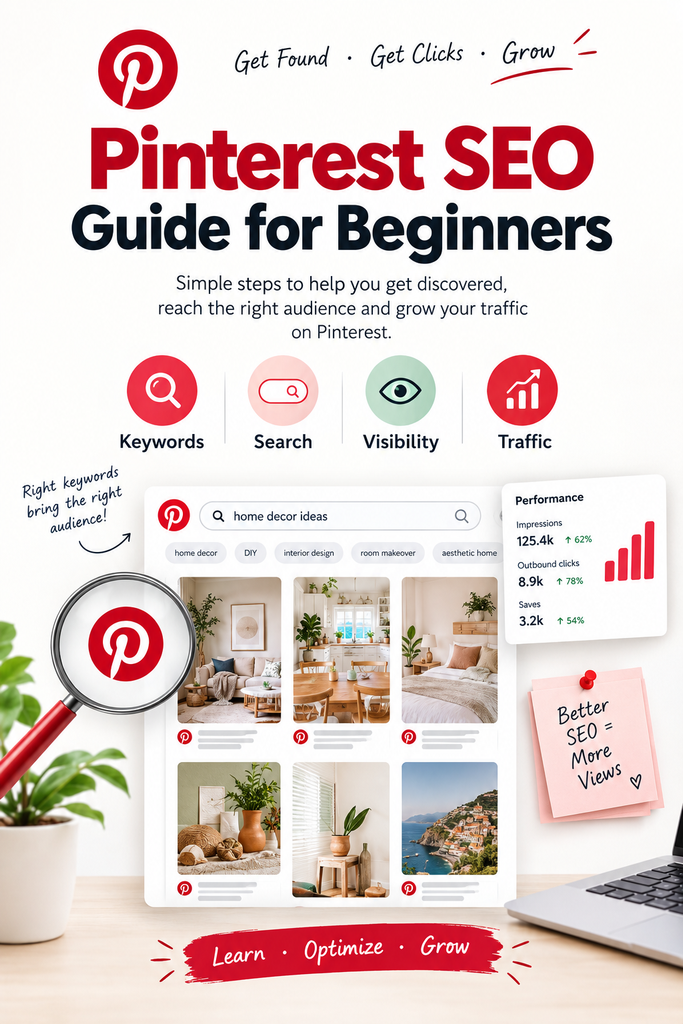
Pinterest SEO Guide for Beginners is a useful starting point if you want to increase your online visibility and bring more visitors to your website. Unlike platforms that mainly focus on social interaction, Pinterest also works as a visual discovery and search platform. As a result, people can discover ideas, products, solutions, inspiration, and useful content through Pinterest searches.
Whether you are a small business owner, blogger, freelancer, designer, creator, or digital product seller, Pinterest SEO can help make your content easier to discover. In addition, this Pinterest SEO Guide for Beginners explains how to optimize your profile, boards, keywords, Pin titles, descriptions, images, and website links. You can then use these techniques to build a more organized Pinterest strategy.
Furthermore, the right Pinterest SEO approach can help connect your content with people who are already interested in your topic. By following the steps in this guide, you can improve how you create and organize your Pins. Therefore, Pinterest can become a useful part of your overall content marketing strategy.
How to Get More Views, Reach & Website Traffic?
Instead of focusing only on followers and likes, focus on search intent and discoverability. Think about what your audience is searching for and how your content can answer those searches. For example, people may search for topics such as:
- Pinterest marketing tips
- Canva templates
- Small business branding ideas
- AI tools for content creation
- Digital product ideas
- Home office inspiration
When your Pin matches a relevant search, it can create another path to your website. As a result, choosing useful topics and relevant keywords can help connect your content with people who are already interested in that subject. You can also create several Pins around different aspects of the same topic.
In addition, useful evergreen content may continue to attract attention after it is published. Your results can depend on the topic, keywords, visuals, and relevance of your content. For this reason, creating helpful Pins consistently can support your long-term Pinterest strategy.
In this Pinterest SEO Guide for Beginners, you will learn how Pinterest SEO works and how to find relevant Pinterest keywords. You will also learn how to optimize your Pins, boards, profile, and website links. Furthermore, you will discover practical ways to create a consistent Pinterest strategy for 2026.
What Is Pinterest SEO?
Pinterest SEO is the process of optimizing your Pinterest profile, boards, Pins, and linked content so relevant users can discover your content. It helps Pinterest understand the topics and information included in your content. In simple terms, you can think of Pinterest SEO as search engine optimization for Pinterest.
Traditional SEO focuses mainly on webpages and search results. Pinterest SEO, however, focuses on content published and shared through Pinterest. In contrast, Pinterest uses information from different parts of your content to understand what your Pins are about.
For example, Pinterest SEO can involve:
- Profiles
- Boards
- Pins
- Pin titles
- Pin descriptions
- Keywords
- Images and videos
- Destination links
Pinterest also has its own search and discovery system. Users can enter keywords into the search bar and discover Pins, boards, profiles, products, and other content. Additionally, Pinterest can show related topics and suggested ideas based on searches.
However, Pinterest SEO is not simply about repeating the same keyword many times. Your goal should be to make the topic of your content clear, useful, and relevant. Instead, focus on creating content that matches what your target audience wants to find.
For example, imagine that you create a Pin titled:
“My New Blog Post”
This title gives very little information about the content. Instead, you could use:
“10 Pinterest SEO Tips for Beginners”
The second title gives Pinterest and users a clearer idea of what they will find. As a result, a specific and descriptive title can make your content easier to understand.
You can apply the same principle to Pin descriptions and boards. Use relevant words naturally rather than forcing keywords into every sentence. Furthermore, make sure the information on your Pin matches the page that visitors reach after clicking it.
Why Pinterest SEO Matters in 2026
Pinterest can be useful for businesses and creators because people use the platform to discover, plan, save, and shop. According to Pinterest, business accounts provide access to tools such as analytics and audience insights, while business accounts are free to create.
Pinterest can support several types of online businesses, including:
- Bloggers
- Coaches
- Designers
- E-commerce stores
- Digital product sellers
- Content creators
- Freelancers
- Service providers
- Small businesses
For example, a blogger might create a Pin about “10 Canva Design Tips for Beginners” and link it to a detailed blog article.
Similarly, a digital product seller could create a Pin titled “Minimalist Canva Planner Templates” and connect it to a relevant product page.
For a small business, a Pin such as “5 Branding Ideas for a New Business” could direct readers to a branding guide or service page.
Pinterest’s business tools also include analytics, website claiming, Rich Pins, and other features that can help businesses understand and develop their presence.
Ultimately, Pinterest works best as part of your content distribution strategy rather than as a replacement for your website.
How Pinterest Search Works
Pinterest search involves several elements working together.
1. Keywords
Keywords help describe what your content is about.
For example:
“Canva templates for small business”
is more descriptive than:
“Templates.”
Pinterest also provides search suggestions as users type. These suggestions can help you understand related searches and topics.
2. Search Intent
Search intent means understanding what someone wants when they search.
For example:
| Search | Likely intent |
|---|---|
| Canva templates | Discover templates |
| Canva templates for Instagram | Find social media templates |
| How to create Canva templates | Learn a process |
| Small business Canva templates | Find business-related templates |
Therefore, your Pin should satisfy the intent behind the search.
3. Pins
Pins are the individual pieces of content people discover and save.
Your Pin should clearly communicate its topic through its headline, visual design, and supporting information.
4. Boards
Boards organize Pins around themes or ideas.
Pinterest describes boards as places to save, collect, and organize Pins. Public boards can also appear in search.
5. Profiles
Your Pinterest profile tells people what your business or creator account is about.
A well-organized profile can make it easier for visitors to understand your content and decide what they want to explore.
6. Engagement
Saves, clicks, and other interactions can provide useful signals about how people respond to content.
Don’t think of engagement as something you can manipulate with a simple formula. Focus on making Pins useful and relevant to the people you’re trying to reach.
7. Fresh Content
Creating new, useful content gives you more opportunities to appear for different searches.
This doesn’t mean you need to publish dozens of Pins every day.
A sustainable publishing system is usually easier for beginners to maintain.
8. Links
Pinterest can connect discovery with your website.
A Pin might lead to:
Pin → Blog post → Related content → Product
This is one reason Pinterest can be valuable for website traffic.
Step 1 — Create and Optimize Your Pinterest Business Profile
If Pinterest is part of your business strategy, consider using a Pinterest business account.
Pinterest states that business accounts are free and provide access to tools such as analytics and audience insights.
Optimize your profile with these elements:
Profile name
Make it clear who you are or what your business offers.
Username
Keep it simple, recognizable, and consistent with your brand.
Bio
Explain what you help people discover, learn, or accomplish.
Website
Add your website so visitors can move from Pinterest to your own content.
Profile image
Use a recognizable logo or professional image that matches your brand.
Profile keywords
Naturally describe your main topics in your profile.
Example
Imagine a small business called Priya Studios.
Instead of a vague profile description such as:
Creative girl making things online ✨
a more descriptive version could be:
AI tools, Canva design, branding ideas, digital products, and online business resources for creators and small businesses.
The second version immediately communicates the account’s main topics.
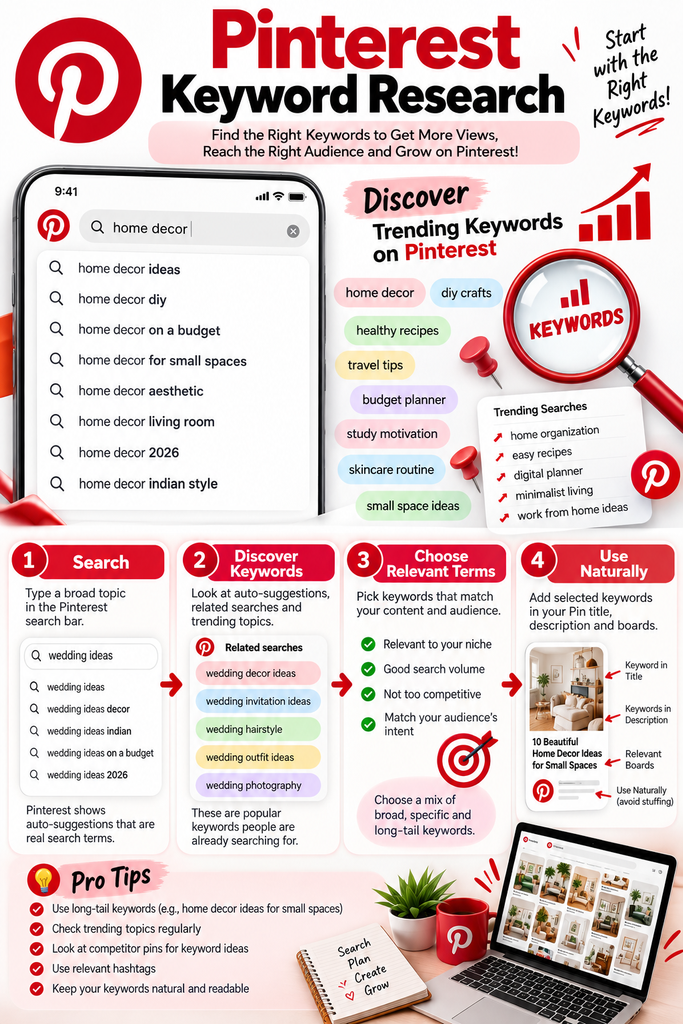
Step 2 — Find the Right Pinterest Keywords
Pinterest keyword research does not have to be complicated.
One of the easiest methods for beginners is to start typing a broad topic into Pinterest’s search bar. Then, review the suggested searches and related topics.
Pinterest recommends using its search and trend tools to understand topics people are interested in.
Start with a broad keyword
For example:
Canva
Then explore related searches such as:
- Canva templates
- Canva templates for Instagram
- Canva design ideas
- Canva tips for beginners
- Canva social media templates
Another example:
You might explore:
- Pinterest marketing
- Pinterest SEO
- Pinterest tips for beginners
- Pinterest business account
- Pinterest content ideas
Another:
Digital products
Possible variations include:
- digital product ideas
- digital products to sell
- Canva digital products
- digital planner ideas
- digital products for beginners
A simple Pinterest keyword research process
- Start with a broad topic.
- Type it into Pinterest search.
- Note suggested phrases.
- Search several related phrases.
- Look at the content appearing for those searches.
- Identify recurring topics and wording.
- Choose keywords that genuinely match your content.
You can also use tools such as Pinterest Trends and other keyword research methods to expand your research. Pinterest specifically recommends Pinterest Trends as a resource for understanding what people want to try next.
Step 3 — Create SEO-Friendly Pinterest Boards
Boards help organize your Pinterest content around clear themes.
Instead of creating a board called:
“My Stuff”
use a topic that describes the content.
For example, a design business could create:
- Canva Design Tips
- Branding Ideas for Small Businesses
- Pinterest Marketing Tips
- Digital Product Ideas
- AI Tools for Creators
Board SEO tips
Choose board names that:
- Clearly describe the topic
- Use natural keywords
- Match the Pins you save to the board
- Are useful to visitors
- Avoid unnecessary symbols or vague wording
Write a short, descriptive board description explaining what people can expect to find.
Pinterest provides tools for creating and organizing boards from a business profile.
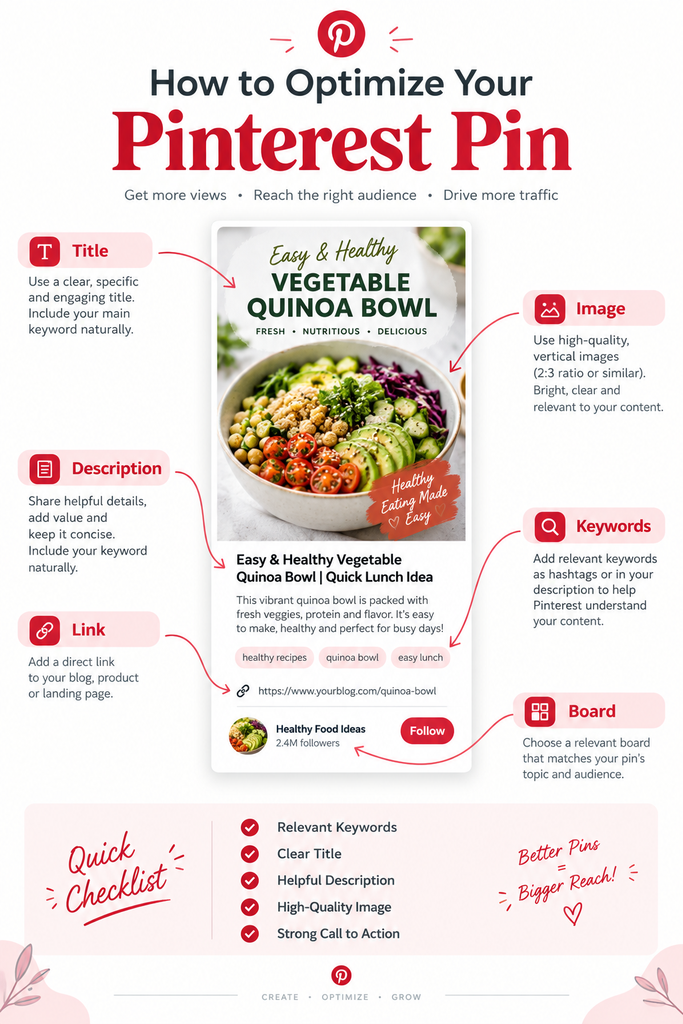
Step 4 — Optimize Your Pin Titles
Your Pin title should make the topic immediately understandable.
Pinterest currently allows Pin titles of up to 100 characters, although shorter titles are often easier to scan.
Here are examples:
| Weak title | Improved title |
|---|---|
| Tips | Pinterest SEO Tips for Beginners |
| My Blog | How to Start Pinterest Marketing for Your Business |
| Canva | 10 Canva Design Tips for Beginners |
| Ideas | 15 Digital Product Ideas to Sell Online |
| Check This Out | 7 Branding Tips for Small Businesses |
Notice the difference.
The improved titles communicate:
- Topic
- Audience
- Benefit
- Search intent
Don’t force keywords into every title.
Instead, ask:
“If someone saw only this title, would they understand what they will find?”
Step 5 — Write Pinterest-Friendly Pin Descriptions
A Pin description gives additional context about the content.
Pinterest currently allows descriptions of up to 800 characters and says descriptions help its system determine relevance for delivery. Pinterest also notes that descriptions don’t appear directly in the home or search feed when viewing a Pin, so don’t rely on the description alone to communicate the main idea.
A simple formula is:
Keyword + value + context + call to action
Learn Pinterest SEO tips for beginners and discover simple ways to optimize your profile, boards, titles, descriptions, and Pins. With this beginner-friendly guide, you can understand the basics and start building a practical Pinterest strategy today.
Looking for Canva design tips for small businesses? For example, discover practical ideas for creating professional social media graphics, Pinterest Pins, and branded content. Then, read the full guide for simple, beginner-friendly design tips.
Discover digital product ideas for beginners, including planners, templates, guides, and other downloadable resources. In addition, learn how to turn your skills into useful digital products and find practical ideas to help you get started.
Keep descriptions natural and useful. At the same time, avoid repeating the same keyword unnecessarily throughout the description.again.
Step 6 — Create Pinterest-Friendly Pin Designs
Pinterest is highly visual, so your design matters.
A good Pin should communicate its topic quickly, especially on mobile devices.
Pinterest’s current specifications include multiple supported aspect ratios, and Pinterest recommends keeping important text and elements within safe areas so they remain visible across devices.
Focus on:
Vertical format
Vertical designs can make better use of the Pinterest browsing experience.
Readable text
Avoid extremely small fonts.
Strong visual hierarchy
Make the main headline easy to identify.
Branding
Use consistent fonts, colors, and visual elements.
Clear headline
Tell viewers what the Pin is about.
Consistent design
Create a recognizable visual style across your Pins.
Mobile readability
Check your design at a smaller size before publishing.
For example, a Priya Studios Pin could use:
Pinterest SEO Guide for Beginners
with a smaller supporting line:
2026 Tips for More Visibility & Website Traffic
The design should support the message rather than overwhelm it.
Step 7 — Add a Relevant Link
Your Pin should lead to a page that matches the promise made by the Pin.
Think:
Pin → Relevant destination
Examples include:
| Pin | Destination |
|---|---|
| Pinterest SEO Guide | Blog post |
| Canva Template Ideas | Canva resource page |
| Digital Planner | Product page |
| Free SEO Checklist | Free resource |
| Branding Tips | Branding article |
| AI Tools Guide | AI resource |
Avoid sending someone to a completely unrelated homepage when the Pin promises a specific resource.
A relevant landing page creates a smoother experience.
Pinterest also offers website-claiming features for businesses, which can help connect content from your website with your Pinterest presence.
Step 8 — Create Multiple Pins for Your Content
One blog post does not have to produce only one Pin.
A single article can become several Pins with different headlines, visual styles, and angles.
Suppose your blog post is:
Pinterest SEO Guide for Beginners
You could create:
Pin 1 — Beginner angle
Pinterest SEO Guide for Beginners: 10 Easy Tips
Pin 2 — Traffic angle
How to Get Website Traffic From Pinterest
Pin 3 — Keyword angle
Pinterest Keyword Research: Beginner’s Guide
Pin 4 — Checklist angle
Pinterest SEO Checklist for 2026
Pin 5 — Strategy angle
Simple Pinterest Marketing Strategy for Small Businesses
All five can lead to the same article if the article genuinely covers those topics.
The designs can be different while maintaining your brand identity.
Step 9 — Publish Consistently
Step 9 — Publish Consistently
Consistency is an important part of building a Pinterest presence. However, you don’t need to create dozens of Pins every day.
Instead, start with a realistic schedule that you can maintain. For example, beginners can create several fresh Pins each week and gradually increase their activity as they become more comfortable with the platform.
A practical workflow is to begin by creating useful content for your audience. After that, turn the content into different Pin designs. Finally, publish those Pins with relevant titles, descriptions, and links.
A simple weekly schedule could look like this:
| Day | Pinterest Activity |
|---|---|
| Monday | Create 2 fresh Pins |
| Tuesday | Publish 1–2 Pins |
| Wednesday | Create new Pin designs |
| Thursday | Publish 1–2 Pins |
| Friday | Check Pinterest analytics |
| Saturday | Create Pins for upcoming content |
| Sunday | Plan the next week’s content |
Most importantly, focus on creating useful content rather than simply increasing the number of Pins. Over time, this approach can help you build a consistent Pinterest content library.a consistent Pinterest content library.
Pinterest SEO Mistakes Beginners Should Avoid
Pinterest SEO is easier when you focus on relevance and usefulness.
Avoid these common mistakes:
1. Keyword stuffing
Don’t repeat the same keyword unnaturally throughout your profile, boards, and descriptions.
2. Using irrelevant keywords
A popular keyword isn’t useful if it doesn’t describe your content.
3. Poor-quality images
Blurry, cluttered, or low-quality visuals can make your content less appealing.
4. Tiny text
If people can’t read your headline on a phone, your design needs improvement.
5. Misleading titles
Don’t promise something your linked page doesn’t deliver.
6. Broken links
Check that your destination URLs work correctly.
7. Ignoring descriptions
Descriptions provide additional context and can help Pinterest understand relevance.
8. Using only one Pin design
Different creative angles can help you test how your audience responds.
9. Inconsistent publishing
Posting heavily for one week and disappearing for several months makes it harder to build a sustainable content system.
10. Ignoring Pinterest analytics
Your analytics can help you understand which content gets attention and which topics deserve more experimentation. Pinterest business accounts provide analytics tools for this purpose.
11. Sending every Pin to the homepage
A specific Pin should ideally lead to a specific, relevant page.
12. Copying competitors
Researching successful content can provide ideas, but your content should offer your own useful perspective.
Pinterest SEO Checklist for Beginners
Use this checklist before publishing.
Profile
- Create a Pinterest business account
- Choose a clear profile name
- Use a recognizable username
- Write a descriptive bio
- Add your website
- Upload a professional profile image
- Clearly communicate your main topics
Keywords
- Research relevant Pinterest keywords
- Check Pinterest search suggestions
- Identify related search phrases
- Match keywords to search intent
- Avoid keyword stuffing
Boards
- Create relevant public boards
- Use descriptive board names
- Write useful board descriptions
- Organize Pins into relevant boards
- Keep board topics focused
Pins
- Create vertical, mobile-friendly designs
- Write clear Pin titles
- Include relevant keywords naturally
- Write useful descriptions
- Use readable typography
- Maintain consistent branding
- Add a relevant destination URL
- Check links before publishing
- Create different Pin designs for important content
Measurement
- Check Pinterest analytics regularly
- Identify successful topics
- Review outbound clicks
- Review saves and engagement
- Use insights to plan future content
Example Pinterest SEO Strategy for a Small Business
Let’s create a realistic example for a small creative business.
Imagine the business sells design resources and educational digital products….(Priya Studios)
Step 1: Blog topic
10 Canva Design Tips for Small Businesses
Step 2: Keyword
Canva design tips
Additional related phrases could include:
- Canva tips for beginners
- Canva design ideas
- Canva for small business
- social media design tips
Step 3: Board
Canva Design Tips for Small Business…(How to Build Your Brand with Canva & AI)
Step 4: Pin title
10 Canva Design Tips for Small Businesses
Step 5: Pin description
Discover 10 practical Canva design tips for small businesses, including layout, typography, branding, and social media design ideas. Read the full guide for beginner-friendly Canva tips.
Step 6: Pin design
Create a vertical graphic with:
10 Canva Design Tips
Supporting text:
Simple ideas for small businesses
Use the brand’s consistent colors and typography.
Step 7: Website link
Link the Pin directly to the relevant blog article.
The complete journey becomes:
Blog topic → Keyword → Board → Pin title → Description → Design → Website
This is the foundation of a simple Pinterest marketing strategy.
Frequently Asked Questions
1. What is Pinterest SEO?
Pinterest SEO is the process of optimizing your Pinterest profile, boards, Pins, keywords, descriptions, and related content so that relevant users can discover it through Pinterest.
2. Is Pinterest a search engine?
Pinterest describes itself as a visual discovery engine. At the same time, its search functionality lets users search for ideas and discover Pins, boards, profiles, products, and other content.
Therefore, while Pinterest isn’t a traditional web search engine like Google, its search and discovery system makes SEO practices useful.
3. Is Pinterest SEO free?
Yes. Pinterest SEO can be performed organically without paying for advertising.
In addition, Pinterest says business accounts are free and provide access to business tools such as analytics. Paid advertising is optional.
4. How do I find Pinterest keywords?
Start by entering broad topics into Pinterest’s search bar and reviewing suggested searches and related topics. You can also use Pinterest Trends and other keyword research methods.
5. How often should I post on Pinterest?
There is no universal number that guarantees success.
Instead, start with a schedule you can maintain consistently. For example, a beginner could test three fresh Pins per week and adjust based on available content and analytics.
6. Can Pinterest drive traffic to my website?
Yes, Pinterest can provide a discovery path to website content when Pins contain relevant links. However, traffic isn’t guaranteed.
In general, results can depend on factors such as topic, content quality, relevance, creative quality, search behavior, competition, and consistency.
7. Do Pinterest hashtags still matter?
Hashtags should not be the foundation of your Pinterest SEO strategy.
Instead, focus primarily on clear topics, relevant keywords, useful content, strong Pin titles and descriptions, and high-quality visuals.
8. How long does Pinterest SEO take to show results?
There is no fixed timeline.
For some Pins, attention may come quickly, while others can take longer to gain visibility. As a result, Pinterest SEO is better approached as a long-term content strategy rather than a quick traffic trick.
Over time, track your analytics and use what you learn to improve future content.
Final Thoughts
Final Thoughts
Pinterest SEO doesn’t need to be complicated.
The basic process is:
Research → Create → Optimize → Publish → Measure → Improve
A clear Pinterest business profile is a good starting point. From there, research relevant Pinterest keywords and organize your content into useful boards. Next, create attractive Pins, write descriptive titles and descriptions, and connect each Pin to a relevant page on your website.
Above all, create content for people first.
Don’t fill your Pins with keywords simply because you’re trying to rank. Instead, choose keywords that accurately describe your content and use them naturally.
Pinterest SEO is a long-term strategy. As you continue, useful content, relevant keywords, strong visuals, consistent publishing, and regular analysis can give your website more opportunities to be discovered.
Explore other Priya Studios resources and blog posts to keep building your skills and creating better digital content.